20% Off for Military and Medical Providers

How to Install the Body Shell for MJX Hyper Go 10210?
Just got your new MJX Hyper Go 10210? Wondering how to mount the body shell correctly on your MJX Hyper Go 10210?

Installing the body shell of the MJX Hyper Go 10210 is really easy, no extra tools required. We’ll show you how in two simple steps!
Step 1: Insert the body shell of your MJX Hyper Go 10210 into the front mount ①, then press the latch vertically down onto the rear mount ②.
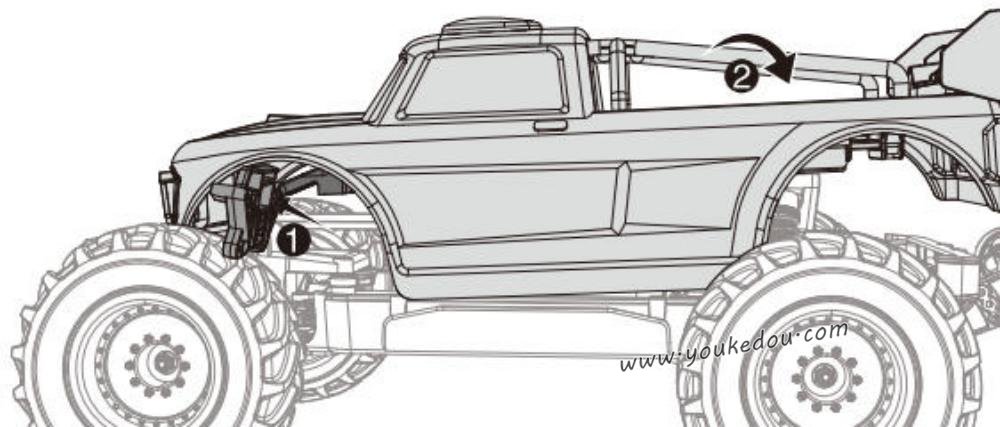
Step 2: Slide the latch to lock the body shell of the MJX 10210.
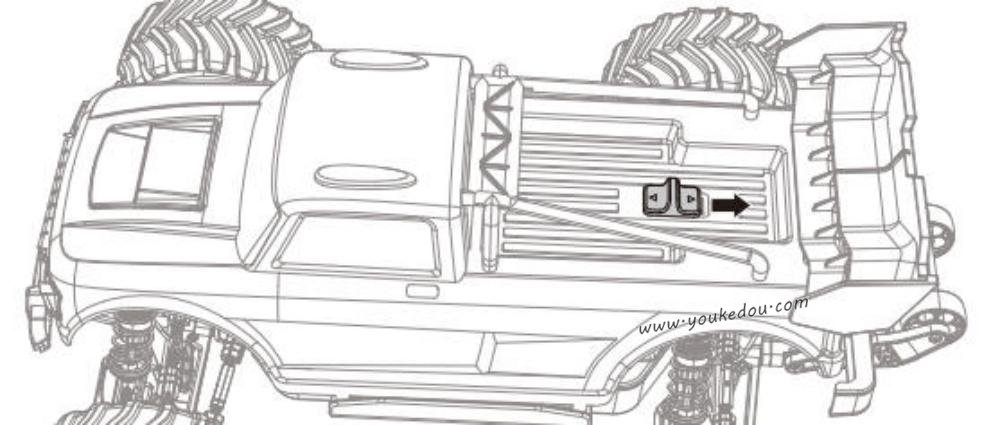
Be careful not to press down on the wiring during installation to avoid pulling or cutting the wires. The MJX Hyper Go 10210 features a quick-release structure. Make sure all latches around the shell are clipped securely.
Before you run your MJX Hyper Go 10210, always double-check the body shell is fitted properly, so it won’t fly off while driving!
Go ahead and install the body shell for your MJX Hyper Go 10210!
If you want to replace the body shell for MJX Hyper Go 10210, click here: P103010 Body (Red) or P13011 Body (Gray).
SHARE